BLUEDRIVER OBD2 Bluetooth Scan Tool Product Review
This articles describe about BLUEDRIVER OBD2 Bluetooth Scan Tool briefly. Some information such as function, ability, and price could be find here in…
Contents
This article describes BLUEDRIVER OBD2 Bluetooth Scan Tool briefly. Some information such as function, ability, and price can be found here in brief.
Detecting the issues on your car manually could be so complicated. You have to check every single part of the car to find out where the problems actually occur. But, with the fast growth of automotive industries, you don’t really have to do this whole complicated thing anymore.
With the presence of car diagnostic tool, the problems that occur on your vehicle can be detected instantly. And from various diagnostic tools in the market, there is one product that is considered a class above the others. It is BLUEDRIVER OBD2 Bluetooth Scan Tool.
If you are an automotive geek, having BLUEDRIVER OBD2 Bluetooth Scan Tool could be so useful. Whenever you have a problem inside your vehicle, it can be detected instantly so you can decide the best possible solution to take.
Therefore, this problem can be solved even before it expands to other parts of the car. And for you who aren’t familiar with this scanning tool, below is the brief explanation about it.
BLUEDRIVER OBD2 Bluetooth Scan Tool
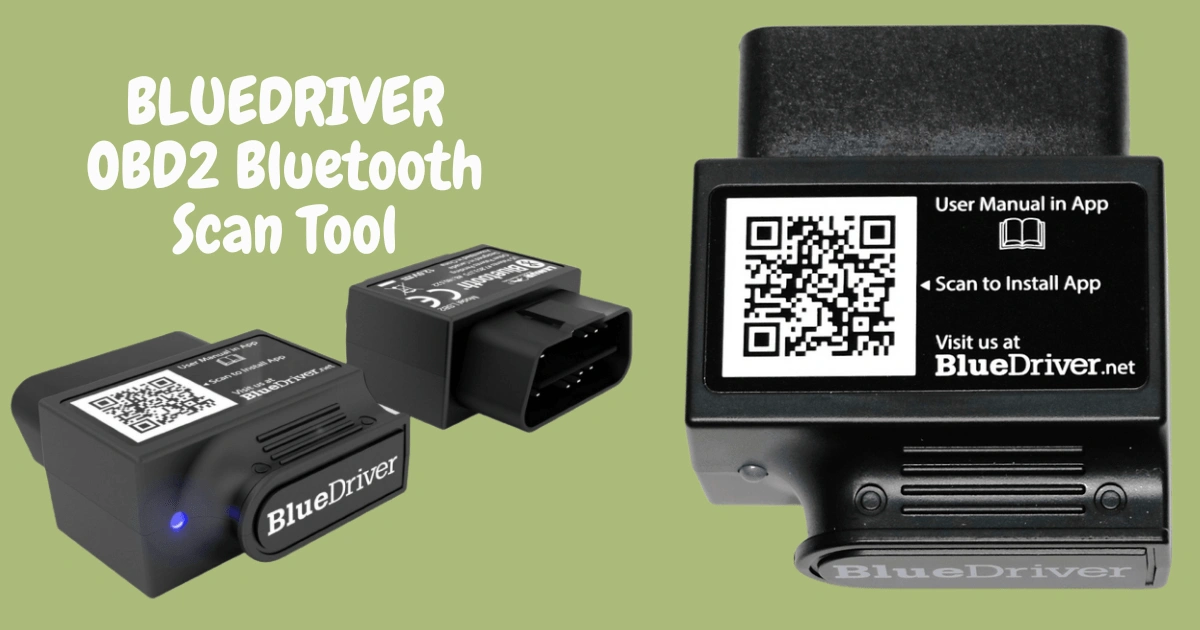
BLUEDRIVER OBD2 Bluetooth Scan Tool is an automotive scanning tool which has many features in it.
With these features, this device is able to detect the error codes and clear them. Moreover, this device is perfect for deciphering the error codes on your vehicle. Something like checking the engine light and providing the best possible solution will be something easy to do.
For the error codes, you can easily read this on the screen. And for the clearing, you can do it as easy as a touch of a button. This way of fixing problem of course could be useful, especially for you who have no mechanical background.
You can easily see the problem on screen as well as the way to fix it. And from this problem list, you can decide which one that should be put as priority.
However, there are some other kinds of data that can be read by BLUEDRIVER OBD2 Bluetooth Scan Tool. These are essential data such as assembly location, VIN Number, fuel consumption, engine data, and engine coolant temperature.
Further, for those who live in the country where emission is a big issue, this scanning tool can be so useful in helping you to test the emission level of your vehicle.
Another interesting thing about BLUEDRIVER OBD2 Bluetooth Scan Tool is the ability of showing the repairmen reports and smog check. This smog check will definitely be useful for you to find out the emission level of your vehicle.
Therefore, if you are going to take a smog test, the smog check result will definitely be helpful to make sure that you might pass the test.
What Is Missing from This Tool
But, unfortunately not all things are going well toward this device. Some people think that the Bluetooth connectivity of this device still has several issues.
And the fact that this device is not compatible with Windows Phone is sometimes annoying. Further, another problem is that this device is only available for the car with OBDII. It means that it’s only capable of scanning vehicles produced after 1996.
Tips for Using an OBD2 Bluetooth Scan Tool
To get the most out of a scan tool like BLUEDRIVER OBD2, a few simple habits can help.
1. Check Compatibility First
As mentioned above, this tool works with cars that have OBDII. Make sure your vehicle and your phone are supported before buying.
2. Read the Error Codes Carefully
Do not clear an error code right away. Read the explanation first, so you understand what the problem is.
3. Prioritize the Problems
Use the problem list to decide which issues need attention first.
4. Use It Before an Emission Test
If you are going to take a smog test, run a smog check first to see whether your vehicle is ready.
5. Keep a Record
Saving the repair reports helps you and your mechanic see the history of your vehicle.
Frequently Asked Questions
What data can BLUEDRIVER read?
Besides error codes, it can read data such as the VIN number, fuel consumption, engine data, and engine coolant temperature.
Is it useful for people without a mechanical background?
Yes. Error codes are shown on screen, and clearing them only takes a touch of a button.
What are the drawbacks of this tool?
Some users report Bluetooth connectivity issues, and it is not compatible with Windows Phone.
Can it help with emission tests?
Yes. Its smog check feature helps you find out the emission level of your vehicle.
Therefore, regardless of its negative sides, the BLUEDRIVER OBD2 Bluetooth Scan Tool at least still has various features and high capability of scanning.
And for those who are fond of automotive, this scanning device will definitely be useful in detecting problems that occur in their vehicles. Finally, if you are interested in buying this device, you can afford it with the price around 99 USD.